API documentation
What the Linqur API does, how you authenticate, the difference between v0 and v1, and where every endpoint is documented.
With the Linqur API you manage your platform from your own systems. You can create and update courses, add or replace SCORM packages, create LTI tools per client, read users and registrations for your reports, create sign-up URLs and enrol users from a webshop or CRM, keep files in the file repository up to date, manage SCORM Proxy wrappers and manage API tokens. Requests and responses are JSON. The 40 endpoints are documented in ten groups; the full list is on API endpoint documentation.
Authentication
Every request carries an API key in the HTTP header Access-Token. You create a key in Linqur, see Create an API key. Anyone with the key can create and delete courses, tools and users on your platform, so keep it out of client-side code and version control.
Versions: v0 and v1
The API has two versions, each with its own base URL on your platform.
| Version | Base URL | What it does |
|---|---|---|
| v0 | https://<your-platform>/local/ltisaas/api.php/v0 | Returns test data. It changes nothing and validates nothing. Use the token dummy. |
| v1 | https://<your-platform>/local/ltisaas/api.php/v1 | Works on the real data of your platform. Use your own API key. |
Build your integration against v0 first to check the request format and the shape of the responses. Then switch the base URL and the token to v1.
Requests and responses
- Every endpoint accepts GET and POST. Uploads, such as a SCORM package, must be POST with
multipart/form-data. Some endpoints take a JSON body; the group pages show which. - Responses are JSON. Most calls return
success: truewith the data. An error returnssuccess: falsewitherroranddebuginfo, and HTTP status 400 (invalid request) or 401 (missing or invalid token). - A response holds at most 2,500 results.
- The reporting endpoints take dates in the format DD-MM-YYYY.
Swagger on your own platform
Your platform has an interactive Swagger page at https://<your-platform>/local/ltisaas/swagger/. It shows every endpoint with its parameters and lets you send requests from the browser.
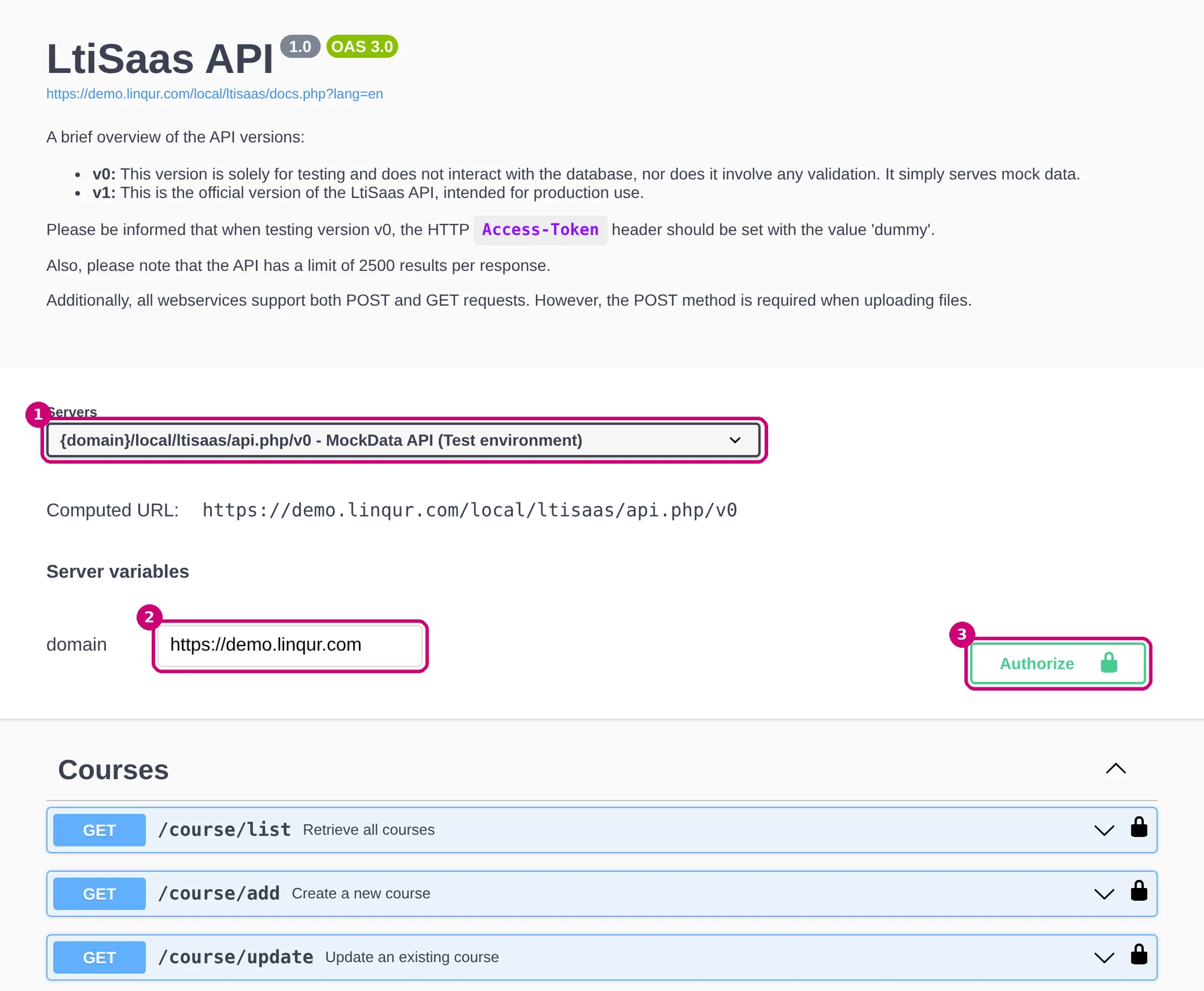
- Choose the server (1): v0 for test data or v1 for your real data.
- Fill in the domain of your platform (2).
- Click Authorize (3) and paste your API key, or
dummyfor v0.
A request you send from Swagger on v1 runs on your real platform. A call to a delete endpoint really deletes.
Endpoints per group
- API: courses
- API: learning objects
- API: LTI tools
- API: analytics
- API: users
- API: members
- API: tokens
- API: sign-up URLs (magic)
- API: SCORM Proxy
- API: files
Practical applications of the API describes common tasks and the endpoints they need. If you work with no-code tools, read how to automate e-learning with Linqur and n8n or build e-learning automations with Linqur and Make.