Getting started with SCORM wrappers
Share a course with a client’s LMS as a small SCORM package, while the content stays in Linqur.
With SCORM Proxy you give a client access to a course, or to one SCORM package, without handing over the package itself. For each client you create a SCORM wrapper. That is a small SCORM package that the client adds to their own LMS. The content loads from Linqur, and you see the results in Linqur. In the market this is also called SCORM proxy or SCORM dispatch.
Why this helps when you update a course is explained in the blog How to update SCORM courses for all your clients at once. To replace a package in Linqur, see how to update a SCORM package.
SCORM wrapper or LTI tool?
| Your client’s LMS | Use | Start here |
|---|---|---|
| Can only import SCORM packages | A SCORM wrapper | Create and download a SCORM wrapper |
| Supports LTI | An LTI tool | Creating a course and sharing it via LTI tools and Publish a SCORM package as an LTI tool |
Not sure? Ask your client which standards their LMS supports.
Where to find it
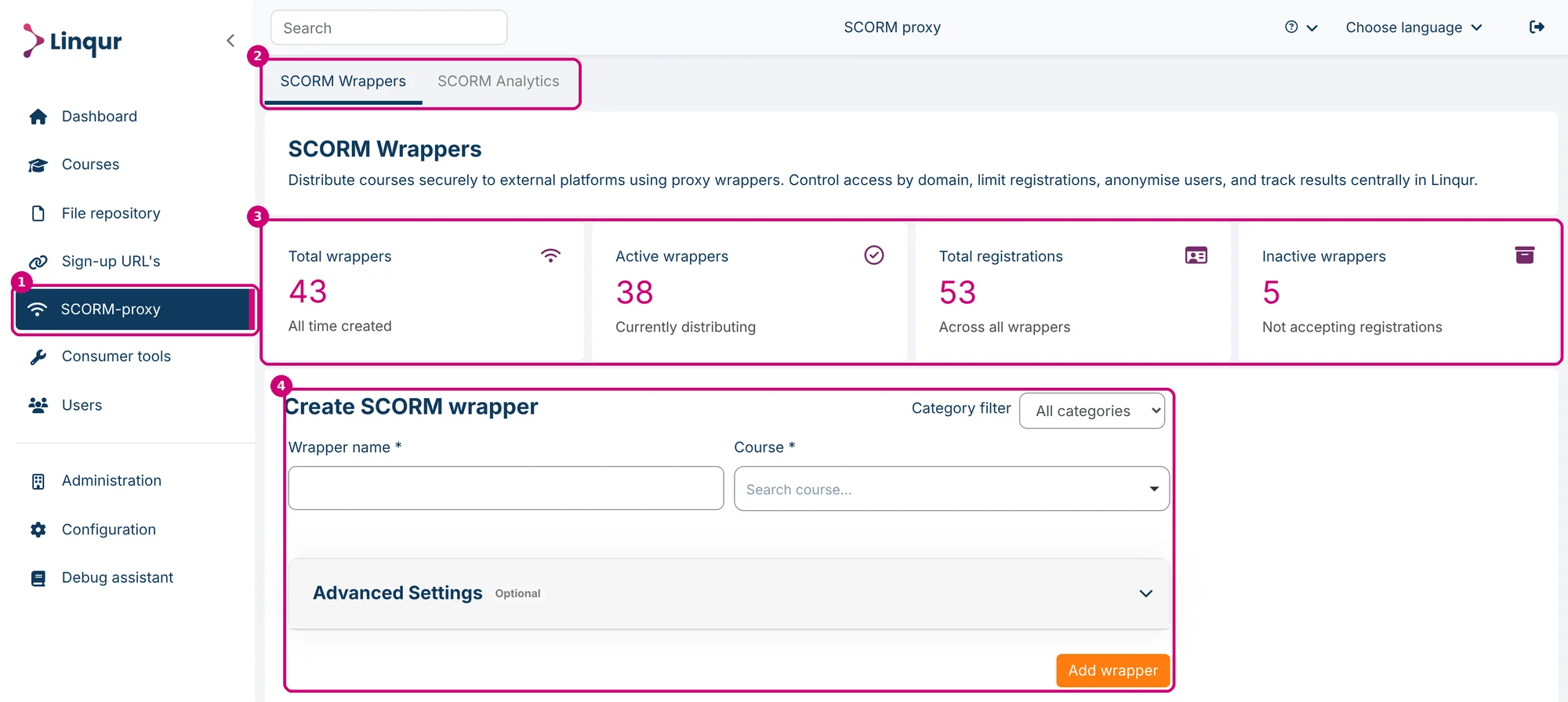
Click SCORM-proxy in the menu (1). The page has two tabs (2): SCORM Wrappers and SCORM Analytics.
At the top of SCORM Wrappers are four tiles (3), each with a short line of text below the number:
| Tile | Text on the tile |
|---|---|
| Total wrappers | All time created |
| Active wrappers | Currently distributing |
| Total registrations | Across all wrappers |
| Inactive wrappers | Not accepting registrations |
Below the tiles you create a new wrapper (4), and below that is the list of all wrappers.
The route in three steps
- Create and download a SCORM wrapper: choose the course or the SCORM package, set the limits and download the wrapper for your client.
- Manage SCORM wrappers: find, edit, deactivate or delete a wrapper.
- View results with SCORM Analytics: see the results of the learners who use your wrappers.