Sign-up URLs: access to learning content without passwords, with full control
Give learners low-friction access to courses through temporary, personal links. No traditional login process, no LMS dependency on the client side, with central control over registration, validity and reporting.

Supported authoring tools



What are Sign-up URLs?
Sign-up URLs are a manageable access and registration layer for learning content inside Linqur. Instead of a traditional password process, you use a temporary link flow: learners sign up via a registration screen and, depending on the flow you configure, either get instant access or first receive a personal Sign-up URL by email.
Per course you create multiple links, each with its own conditions: validity, maximum number of registrations, allowed email domains and status. That makes Sign-up URLs fit both open campaigns and client- or cohort-specific access, without the client needing their own LMS.
Read: Logging in without a password, how do you approach it?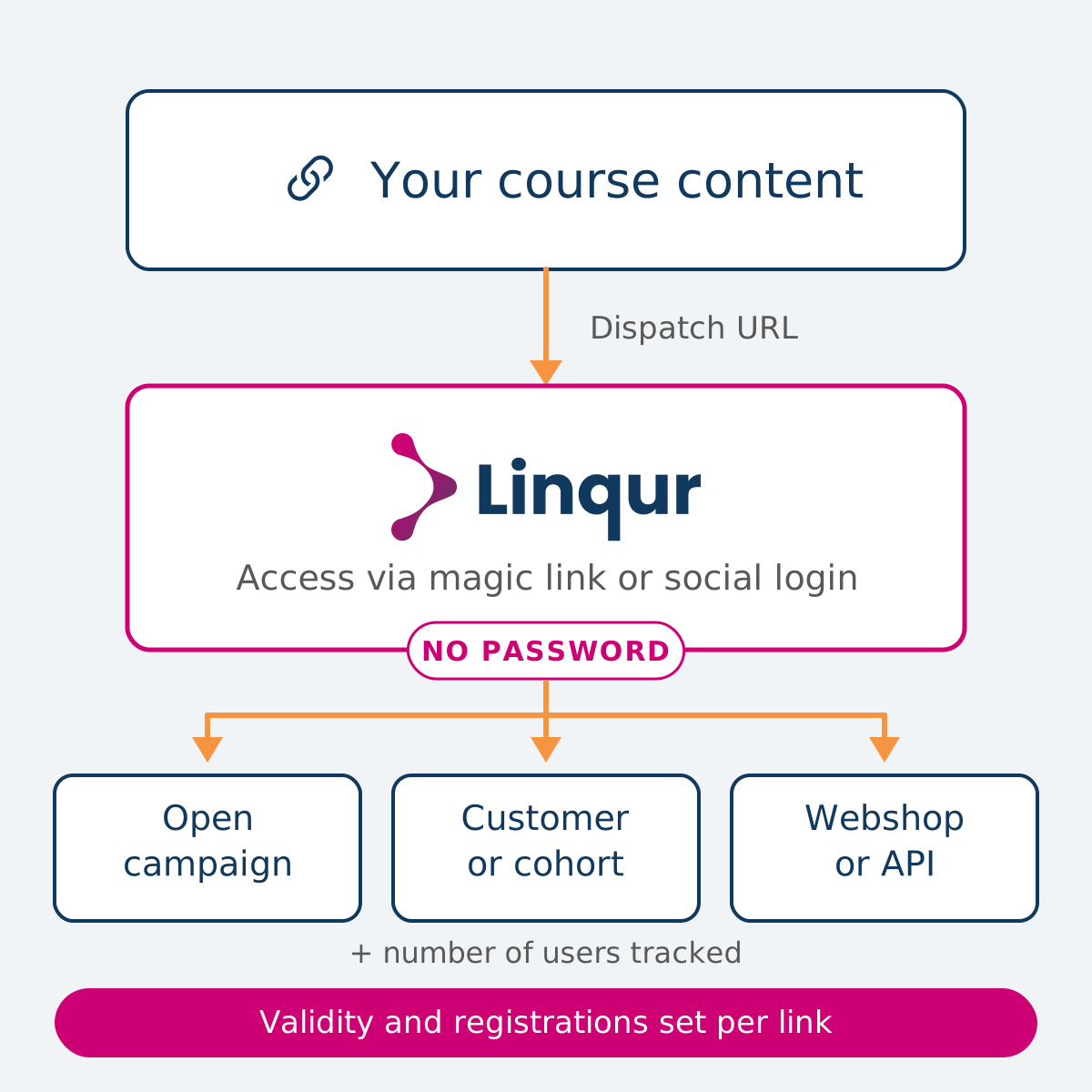
Built for organisations that distribute courses without a client LMS
If you want to give end users fast, friction-free access to learning content while keeping control over registration and reporting, Sign-up URLs offer the right balance between ease of use and control.
Content providers without a client LMS
You want to deliver courses to clients who do not have their own LMS, without setting up a full learning platform. Sign-up URLs give their learners direct access, while registration and progress stay in Linqur.
Webshop and campaign flows
Through the WooCommerce integration and API you register learners automatically after purchase and send them a personal Sign-up URL straight away. No manual enrolment, no second account to remember.
Own portals and login workflows
Use Sign-up URLs as a practical SSO step inside your own portal or billing flow. End users log in via your environment and move effortlessly into the course.
Pilots, events and cohort access
Give a specific group temporary access, for example for a pilot or an event, with a hard end date, a maximum number of registrations and a domain restriction per link.
Problems you no longer have with Sign-up URLs
Access to learning content often breaks at passwords, expired licences and manual reporting. This is how Sign-up URLs remove those barriers, organised around distributing, managing and reporting.
No more handing out passwords
Learners receive a personal Sign-up URL by email or click through from your own portal. No login form, no forgotten passwords, no support tickets.
No more typing in details
On the sign-up page a learner can also sign in with a Google or Microsoft account. One click, and the registration is done with the account they already use at work.
No more manual registrations after a sale
Through the WooCommerce integration or the Linqur API you register learners automatically and send them a Sign-up URL straight away. Purchase and access run in a single flow.
No more open access after the deadline
Per link you set a start and end date, plus a maximum number of registrations. As soon as the period or limit is exceeded, the link stops working and shows a clear message to the user.
No more unwanted registrations
Restrict registration to specific email domains per link. That way you know the right audience or client gets access, even if the link is shared.
No more separate exports per client
All registrations, progress, completion and scores live centrally in Linqur. Filter by link, user, course or period and export to Excel or PDF for client reporting.
No more blind spots on usage
See per Sign-up URL who registered, how far they got and when they were last active. The Custom Search Builder and column visibility let you tailor reports to the audience.
How Medela gets healthcare professionals into accredited e-learning
Nurses, midwives and maternity care workers sign up for Medela's e-learning with their professional registration number and go straight into the course. Medela exports what it needs for accreditation in about half an hour, and nine hospitals run the same e-learning from their own LMS through LTI.
Read the Medela storyIt's not only user-friendly for us. It's also user-friendly for the customer who goes into it. Our own customers can get into Linqur very easily.

Get started with Sign-up URLs in 5 steps
Connect a Sign-up URL to a course
Create a Sign-up URL in Linqur per course. Give the link an internal label, a validity period, a maximum number of registrations and optionally a domain restriction.
Share the link or connect it to a workflow
Share the general link with your audience, connect it to your WooCommerce flow or use the Linqur API to send personal Sign-up URLs from your own system.
Learners sign up
Existing users are signed in immediately. New users register via the sign-up screen and, depending on the flow you configured, either get instant access or first receive a personal Sign-up URL by email.
The learner starts the course without a password
The learner clicks the link and lands directly in the course. No password, no second account. Existing access is preserved, even after the link expires.
Track results and adjust
See per Sign-up URL who completed, which scores were achieved and what the latest activity was. Disable a link to stop new access, without affecting existing learners.
Sign-up URLs: technical specifications
| Specification | Detail |
|---|---|
| Authentication model | Link-based access, no traditional password process |
| Access variants | General link per course or personal flow per user via email |
| Sign-in options | Registration form on the sign-up page, or sign in with a Google or Microsoft account |
| Configuration per link | Course, label, description, start and end date, maximum number of registrations, allowed email domains, status |
| LMS dependency | Not required on the client side |
| Integrations | WooCommerce plug-in, Linqur API, own portals and login workflows |
| Reporting fields | Name, email, course, hash, label, progress, completion, score, completion time, last access |
| Filters and reporting | Filter by link, user, course or period, Custom Search Builder, free search, column visibility |
| Export | Excel and PDF |
| Hosting and compliance | EU-hosted (Amsterdam), GDPR-compliant, Linqur security standards |
| Behaviour on expiry | New access is refused with a clear message, existing users keep access to their course |
Privacy and security by design
The learner data and access logs captured via Sign-up URL are processed according to the strictest European standards for information security and privacy protection.
ISO 27001 certified
Our information security has been independently audited and meets the international ISO 27001 standard.
ISO 9001 certified
Our processes and services meet the international ISO 9001 standard for quality management.
Data stored in the Netherlands
All your data is stored on servers in the Netherlands. Fully inside the EU, GDPR-compliant, without transfer to third countries.
DPA available on request
A Data Processing Agreement (DPA) is available on request so that you can always meet your GDPR obligations.
Questions about security or privacy? Get in touch via info@linqur.com
Frequently asked questions
Ready to give access without passwords?
Schedule a demo and discover how Sign-up URLs fit your distribution model, without an LMS dependency and with full control over registration and reporting.