Linqur WooCommerce plug-in: sell courses through WooCommerce and grant access automatically
Connect your WordPress webshop directly to Linqur. After a purchase, the participant is registered automatically and gets immediate access to the course. No manual registrations, no separate emails, no voucher codes.

What is the Linqur WooCommerce plug-in?
The Linqur WooCommerce plug-in is built for training providers who sell courses online through their own WordPress webshop and then want to give participants automatic access to the right learning environment. Instead of manually creating users, sending emails and activating access, the plug-in connects WooCommerce directly to Linqur.
That way you keep your own webshop, customer relationship and payment process, while Linqur handles the learning logic and access centrally. Sales stay in your familiar environment, learning becomes automated. This makes the Linqur WooCommerce plug-in a strong fit for training providers who want to streamline course sales without giving up control or user experience.
Read: how to sell courses online without operational overhead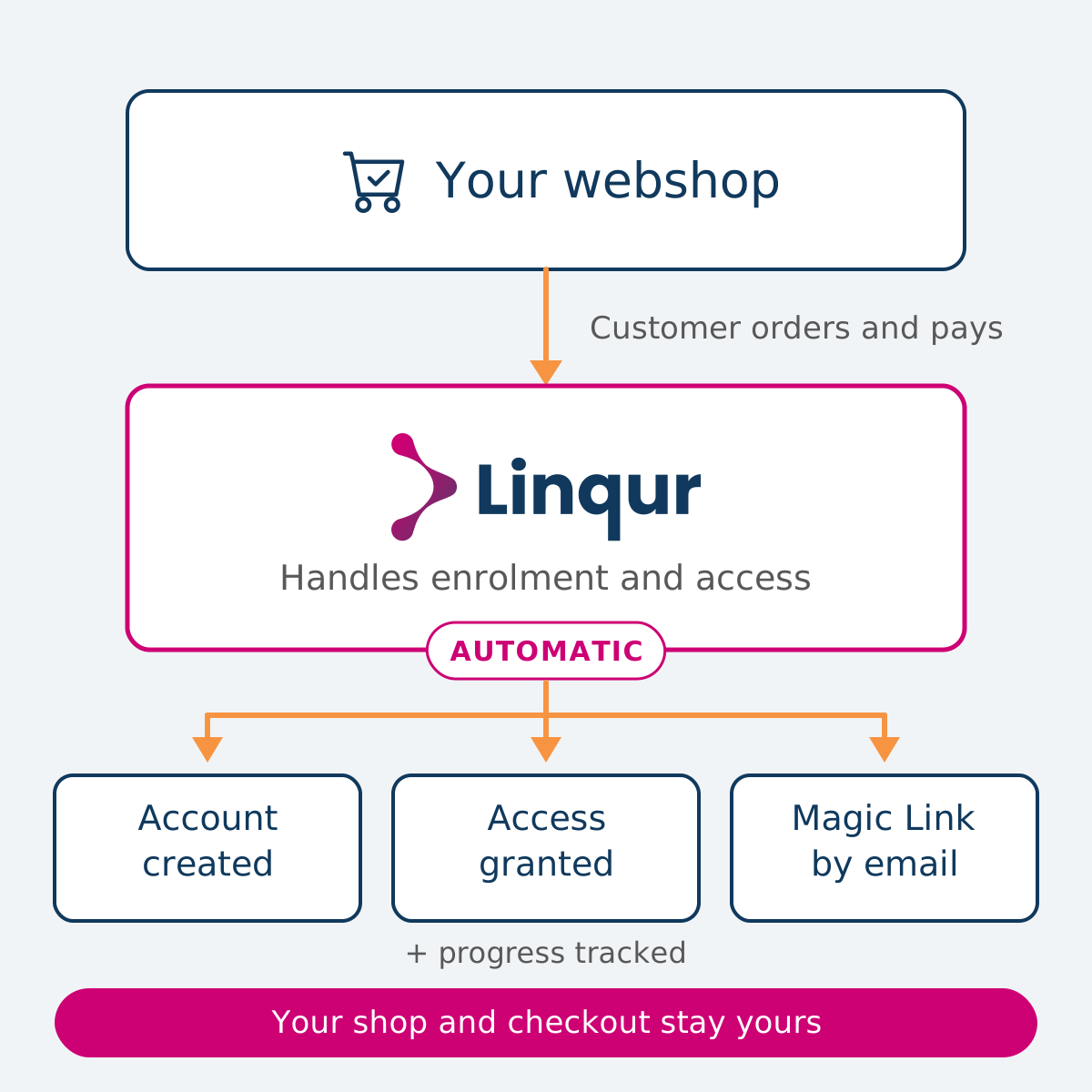
Course sales with and without the Linqur WooCommerce plug-in
What changes in practice once your webshop and learning environment are connected?
| Without the Linqur WooCommerce plug-in | With the Linqur WooCommerce plug-in |
|---|---|
| Manually create a user in Linqur for every order | Automatic participant registration through the Linqur API |
| Send separate access emails and voucher codes | Participant receives the access route automatically by email |
| Questions from participants about logging in and access | Sign-up URLs or login screen, without password hassle |
| Sales and progress spread across separate systems | Results and completion centrally visible in Linqur |
| More sales means more operational pressure | Scalable without extra manual work per order |
How O&O fonds NWb sells asbestos e-learning through a webshop
Thousands of contractors needed an asbestos certificate within a short period. Selling the course used to mean a voucher code by email and a separate invoice for every order, often a small one. Now contractors buy through a webshop that uses Linqur to take care of payment, invoicing and access, and two people handle it all: around 15,000 completions through Linqur.
Read the O&O fonds NWb storyWe probably would have put a temp on it. Someone doing nothing all day but orders and invoices.

From purchase to access in 5 steps
Participant buys a course in WooCommerce
The course is offered as a product in your own WordPress webshop and paid for via your standard payment method. Courses from Linqur are linked to products in WooCommerce.
The plug-in processes the order
The Linqur WooCommerce plug-in processes the completed order and uses the Linqur API to register the participant for the right course automatically.
Participant receives the access route by email
The participant automatically receives the chosen access route: a personal Sign-up URL or instructions to log in via the Linqur login screen.
Participant logs in again later
For a follow-up session, the participant logs in again via Sign-up URL or via the login screen, depending on the flow you have set.
Progress and results stay visible in Linqur
The administrator keeps central insight into progress, results and completion, without separate administration per order.
Linqur WooCommerce plug-in: technical specifications
| Specification | Detail |
|---|---|
| Technical basis | WordPress with WooCommerce, connected to the Linqur API |
| Connection to Linqur | Via Linqur Domain and Linqur Token, authentication with an API token |
| Access mechanism | Sign-up URLs by email or login via the Linqur login screen |
| Payment processing | Any PSP and payment method supported by WooCommerce |
| Configuration | General tab for the connection, Email tab for templates, ACF tab for profile mapping |
| Email templates | Subject and content configurable per flow, with HTML or text content |
| Placeholders | first_name, last_name, email, magic_link, product_list, domain_url |
| Profile mapping | ACF fields linked to a Linqur Profile Field Shortname, only filled-in rows are sent |
| Connection check | Test connection directly from the plug-in configuration |
| Reporting | Progress, results and completion centrally visible in Linqur |
| Updates and support | Plug-in updates and support included, WordPress installation and core updates not by Linqur |
Privacy and security by design
The participant and sales data processed by the Linqur WooCommerce plug-in between WooCommerce and Linqur is handled according to the strictest European standards for information security and privacy protection.
ISO 27001 certified
Our information security has been independently audited and meets the international ISO 27001 standard.
ISO 9001 certified
Our processes and services meet the international ISO 9001 standard for quality management.
Data in the Netherlands
All your data is stored on servers in the Netherlands. Fully within the EU, GDPR compliant, without transfer to third countries.
Data Processing Agreement
A DPA (Data Processing Agreement) is available on request, so you can always meet your GDPR obligations.
Questions about security or privacy? Get in touch via info@linqur.com
Frequently asked questions
Ready to automate your course sales?
Schedule a demo and discover how the Linqur WooCommerce plug-in links your WooCommerce webshop to Linqur, so sales, access and reporting run through in one flow, without extra manual work per order.